Tuesday, March 18, 2014

Simple way to convert Rows to Columns dynamically in SQL Server using PIVOT keyword

Here I will explain how to convert Rows to Columns dynamically in SQL server using PIVOT keyword.This is a very simple example of Pivot query for the beginners.

Pivot keyword in sql query help us to generate table that quickly combines and compares large amounts of data.We can convert its rows and columns to see different summaries of the source data.Pivot keyword also help us to create Multidimensional reporting.


Database

 For this example I have created a database named InvoiceDB which has a table named tbl_invoice    with the schema as follows.


In the tbl_invoice Table I have inserted few records as shown below


SELECT * FROM 
(
SELECT Invoice_Year,Invoice_Month,Invoice_Amount
FROM 
tbl_invoice
)
as s PIVOT 
(  
SUM(Invoice_Amount)
 FOR [Invoice_Month] IN (jan, feb, mar, apr, may, jun, jul, aug, sep, oct, nov, dec)
)AS s


Sunday, March 16, 2014

SQL Query to Get Common Words from Multiple Strings or Sentences - SQL Server 2008

Here I will explain how to get common words from multiple strings or sentences using SQL Query in SQL Server 2008/12.

 Example

Sentence 1: ASP.NET solutions Center

Sentence 2: we are providing solutions on ASP.NET

Sentence 3: I like ASP.NET solutions

sentence 4: Best web solutions using ASP.NET

The result should be: ASP.NET solutions

Based on SQL Server version Configuration, you will need a split  function that can split a string on a different delimiter(LIKE Space,Common) of choice. Here's such a function.


CREATE FUNCTION [dbo].[uf_Split]
(
@InputData NVARCHAR(MAX),
@Delimiter NVARCHAR(5)
)
RETURNS @table TABLE (ID int IDENTITY(1,1), data NVARCHAR(MAX), descriptor varchar(255) NULL)
AS 
BEGIN

DECLARE @textXML XML;

SELECT @textXML = CAST('<s>'+ REPLACE(@InputData, @Delimiter, '</s><s>' ) + '</s>' AS XML); 

INSERT INTO @table(data) 
SELECT RTRIM(LTRIM(T.split.value('.', 'nvarchar(max)'))) AS data FROM @textXML.nodes('/s') T(split) 

 RETURN 
END

Following are some cases to get common words using split function by executing sql query

CASE - 1 (Get Common Words from two Sentence)

SELECT 
sentence1.data FROM dbo.uf_Split('ASP.NET solutions Center',' ') sentence1
INNER JOIN dbo.uf_Split('we provide solutions on web technologies ',' ') sentence2
ON sentence1.data = sentence2.data


After execute above query we got following result:


CASE - 2 (Get Common Words from three Sentence)

SELECT 
sentence1.data FROM dbo.uf_Split('ASP.NET solutions Center',' ') sentence1  
INNER JOIN dbo.uf_Split('we are providing web solutions on ASP.NET',' ')
sentence2 ON sentence1.data = sentence2.data
INNER JOIN dbo.uf_Split('I like ASP.NET Solutions',' ') sentence3
ON sentence2.data = sentence3.data
order by data

 
After execute above query we got following result:


CASE - 3 (Get Common Numbers From different group of Numbers per Sentence and for that we need to use comma as delimiter to split numbers)

SELECT 
sentence1.data FROM dbo.uf_Split('145,107,454,687',',') sentence1 INNER JOIN dbo.uf_Split('569,456,454,258,321,107,1513',',') sentence2
ON sentence1.data = sentence2.data
INNER JOIN dbo.uf_Split('5231,789,489,687,107,454,9631',',') sentence3
ON sentence2.data = sentence3.data
INNER JOIN dbo.uf_Split('852,454,896,5241,6589,107',',') sentence4 ON sentence3.data = sentence4.data
order by data


After execute above query we got following result:


Friday, March 14, 2014

Combine multiple rows of table into single row in SQL Server

Here I will explain about how to get multiple rows data  and combine that data into single row using SQL query in SQL Server 2005/2008.

Example:

I have created one table with named tbl_User like below :


In the tbl_user Table I have inserted few records as shown below


So now we need to combine user names(UserName) based on group name(GroupName) using
 FOR XML PATH .


SELECT
   STUFF((SELECT ', ' + cast(UserID as varchar(20)) 
   from tbl_user t2
   where t1.GroupName = t2.GroupName
   FOR XML PATH(''), TYPE ).value('.', 'NVARCHAR(MAX)')
   ,1,2,'') 'User ID'
   ,
   STUFF((SELECT ', ' + cast(UserName as varchar(20))  
   from tbl_user t2
   where t1.GroupName = t2.GroupName  
   FOR XML PATH(''),TYPE ).value('.', 'NVARCHAR(MAX)')
   ,1,2,'') 'Group of name'
   , t1.GroupName
from tbl_user t1
Group By t1.GroupName


After execute above query we got following result :


Wednesday, March 12, 2014

Get Output parameter value from Stored Procedure in Asp.Net using C#

Here I will going to explain how to use and get value from Stored Procedure using Output Parameter in ASP.Net C#.

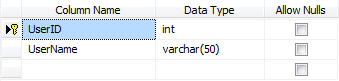
 For this post I have a Table with named tbl_user is used which contains UserID and UserName columns. The name of the User is fetched by UserID using Output Parameter in SQL Server Stored Procedure in ASP.Net c#.

Database

For this example I have created a database named UserDB which has a table named tbl_User with the schema as follows.


In the tbl_user Table I have inserted few records as shown below


Connection String

Following is the connection string defined in the Connection Strings section of the Web.Config file.
You need to modify it as per your SQL Server Instance and Database name.


< connectionStrings >
 <addname="constr"connectionString="Data Source=.\SQL2008;Initial Catalog=UserDB;User id = sa;password=sa@123"/>
</connectionStrings>


HTML Markup

The HTML consists of an ASP.Net TextBox in which the User Id will be passed to the
SQL Server Stored Procedure, an ASP.Net Label within which the name of the User fetched using Output Parameter will be displayed and finally an ASP.Net Button press to trigger the process of fetching the User Name from tbl_User table based on supplied User Id.


Enter UserId:
<asp:TextBox ID="txtUserId" runat="server" />
<asp:Button ID="btnSubmit" OnClick="Submit" Text="Submit" runat="server" />
<br />
<br />
<asp:Label ID="lblUserName" runat="server" />


Stored Procedure
 The Stored Procedure accepts the following two Parameters
1. UserId – This is an INPUT Parameter used to pass the Id of the User.
2. UserName – This is an OUTPUT Parameter used to fetch the Name of the User based on its UserId.

Note: Output Parameter is identified by the keyword OUTPUT.


SET ANSI_NULLS ON
GO
SET QUOTED_IDENTIFIER ON
GO
CREATE PROCEDURE [dbo].[GetUserName]
      @UserId INT,
      @UserName VARCHAR(50) OUTPUT
AS
BEGIN
      SET NOCOUNT ON;
     
      SELECT @UserName = UserName
      FROM tbl_User
      WHERE UserID = @UserId
END


Get Output parameter from Stored Procedure in ASP.Net

The following event handler is execute when the Button is pressed, it simply makes a database call to the stored procedure GetUserName.

First the Input Parameter @UserId is added along with Value i.e. the User Id entered in the TextBox using AddWithValue method.

Next the second Parameter @UserName is added. Since @UserName is an Output Parameter we cannot use AddWithValue function hence it is added using the Add method of SqlCommand with its Data Type and Size specified.

Once the @UserName Parameter is added, then its Direction is set to Output since by default the Direction of all Parameter is Input.

Once the Stored Procedure is executed, the value fetched from the Stored Procedure is stored in the Value property of the @UserName Output Parameter.

Finally the name of the User is displayed on page.


protected void GetUserName(object sender, EventArgs e)
{
    string constring = ConfigurationManager.ConnectionStrings["constring"].ConnectionString;
    using (SqlConnection con = new SqlConnection(constring))
    {
        using (SqlCommand cmd = new SqlCommand("GetUserName", con))
        {
            cmd.CommandType = CommandType.StoredProcedure;
            cmd.Parameters.AddWithValue("@UserId",                  int.Parse(txtUserId.Text.Trim()));
            cmd.Parameters.Add("@UserName", SqlDbType.VarChar, 50);
            cmd.Parameters["@UserName"].Direction = ParameterDirection.Output;
            con.Open();
            cmd.ExecuteNonQuery();
            con.Close();
            lblUserName.Text = "User Name : " + cmd.Parameters["@UserName"].Value.ToString();
        }
    }
}


Tuesday, March 11, 2014

Get Asp.net Textbox value using javascript | Get Server Controls value using javascript

Here I will happy to illustrate how to get asp.net textbox value using JavaScript or get asp.net controls like Label ,Gridview value using JavaScript.

Get Asp.net Textbox, Label and GridView Value using JavaScript

To get asp.net textbox, label, GridView value using JavaScript we need to write a code like as below

Get Textbox value

var UserName = document.getElementById("<%=txtUserName.ClientID %>").value;


Get Label value

var Birthdate = document.getElementById("<%=lblBirthDate.ClientID %>").innerHTML;


Get GridView value

var GridView = document.getElementById("<%=gvData.ClientID %>");

 //check if gridview rows count is more than zero or not
 if (GridView.rows.length > 0) 
   {
       //do something if gridview rows count > 0
   }
else
  {
      //do something if gridview rows count < 0
  } 

Friday, March 7, 2014

Difference between String and Stringbuilder in Asp.net - c#


Here I will happy to explain what is difference between string and stringbuilder in asp.net using C#.


String
StringBuilder
It’s an immutable(means once we create   string object we cannot modify) It’s mutable(means once we create string builder object we can perform any operation like insert, replace or append)
In string we do not have append keyword In StringBuilder we can use append keyword
String is slow performance wise because every time it will create new instance stringbuilder is high performance wise because it will use same instance of object to perform action like insert, replace or append
String belongs to System namespace Stringbuilder belongs to System.Text namespace
Example
string strTest = "hello";
strTest += "wow"; // create a new string instance
strTest += "nice"; // create a new string instance
Example
StringBuilder sb = new StringBuilder("hello");
sb.Append("wow");
sb.Append("nice");
string strTest = sb.ToString();


Monday, March 3, 2014

SQL Server : String or Binary Data Would be Truncated. The Statement has been Terminated

String or Binary Data Would be Truncated. The Statement has been Terminated


Here I will happy to explain how to solve the issue of “string or binary data would be truncated. The statement has been terminated.” in SQL server. 

On one day I am trying to insert data into table using SQL querie at that time
I got error like “String or binary data would be truncated. The statement has been terminated.” Actually this issue because of I declared column datatype varchar(50) but I am inserting data more than 50 characters in that column. To solve this problem I modified column datatype varchar(50) to varchar(100) 


Here I will explain with one example I have query like this for insert new record in database  


DECLARE @personalDetails TABLE(Id INT, UserName VARCHAR(20),Designation VARCHAR(10))
INSERT INTO @personalDetails (Id,UserName,Designation)
VALUES(1,'vibhav bhavsar','Software Engineer')
SELECT * FROM @personalDetails  


 If you mark above query I have declared Designation field with VARCHAR(10)
and inserting more than 10 characters into user table so that I got error like


To solve this issue changed Designation datatype size VARCHAR(10) to VARCHAR(50) and run the below query 


DECLARE @personalDetails TABLE(Id INT, UserName VARCHAR(20),Designation VARCHAR(50))
INSERT INTO @personalDetails (Id,UserName,Designation)
VALUES(1,'vibhav bhavsar','Software Engineer')
SELECT * FROM @personalDetails  


- Thank You